


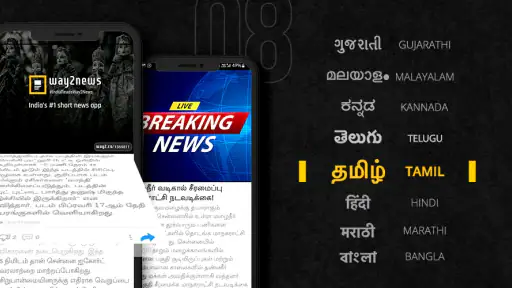
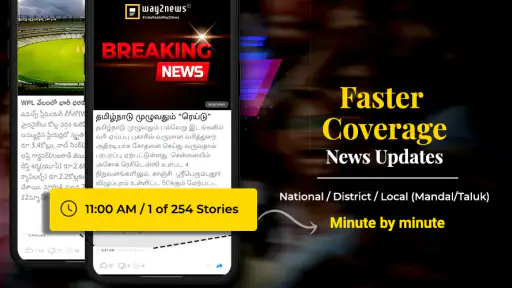
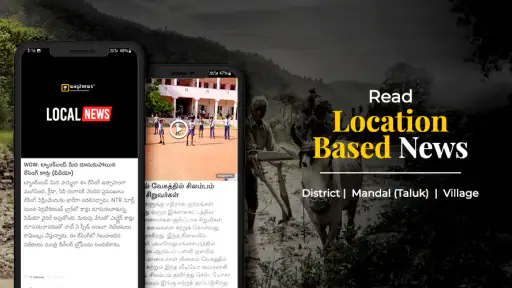





I approached Way2News Daily News App as someone who wanted a quick way to keep up with the day without spending a long time inside a traditional newspaper app. It is a free news and magazines app from Way2News, formerly known as Way2SMS, and its focus is especially clear: short, accessible updates covering daily news, election results, current affairs, and exam results in Telugu and Tamil.
That focus makes it different from a broad international news reader. I would not install it expecting a carefully designed replacement for every newspaper, television bulletin, or specialist publication. I would install it when I want a fast overview of important developments, particularly if Telugu or Tamil is the language I read most comfortably. In my experience, that narrower purpose is also its main strength: the app tries to reduce the effort between opening the phone and understanding what is happening.
What to expect before you begin
The app belongs to the News & Magazines category, but it feels more like a daily briefing tool than a digital magazine subscription. The useful question is not whether it can replace every source of information. The better question is whether it can help me check the day’s main topics quickly, then decide which stories deserve a deeper look elsewhere.
Its audience is broad enough to include students, commuters, working users, parents, and anyone who prefers regional-language updates. The inclusion of exam results gives it a practical role beyond general headlines. A student may open it with one specific purpose, while another user may use it during breakfast to scan current affairs and local developments.
The app is free, carries an Everyone age rating, and supports devices running Android 5.0 or later. That makes it approachable for people using older Android phones rather than only recent models. The current version is 9.54, so I would still keep the app updated through the normal app store process, especially when a news application is used for time-sensitive information.
Public interest in the app is substantial: it has passed fifty million installs and holds a 4.6 average from about 1.2 million ratings, alongside roughly 4.7 thousand written reviews. Those figures do not prove that every reader will enjoy the experience, but they do suggest that the app has found a large audience and that its regional-news approach is not a niche experiment.
One important expectation to set is that speed and convenience come before deep reporting. A compact update can tell me what happened, but it may not provide the background, competing viewpoints, or full context I would want before making an important decision. I treat the app as a first stop: useful for awareness, but not automatically my only source for serious matters.
Who will get the most from it
I think the best match is a reader who wants news in Telugu or Tamil and prefers short sessions. If I have only a few minutes before work, a quick scan is more realistic than opening several full newspaper sites. The same applies to someone who finds English-heavy news services tiring or who wants regional-language coverage to be part of a daily routine.
Students can also find a clear use case in the current-affairs and exam-result focus. The app can help me remember to check relevant updates instead of relying entirely on occasional searches. However, I would verify official result details through the responsible examination authority before treating any result as final, especially when a deadline, admission decision, or document submission depends on it.
The weaker match is a reader who wants long-form journalism, extensive international coverage, or a highly customizable feed built around specialist publications. In that situation, a full newspaper app, a dedicated RSS reader, or official websites may offer better depth and control. Installing this app alongside those tools makes more sense than expecting it to do every job.
Starting with the right setup
After installing the app, my first useful step would be choosing the language and topics that feel relevant rather than trying to read everything immediately. Since Telugu and Tamil are central to its identity, the language choice matters more here than it would in a general news aggregator. A reader should take a moment to make sure the selected language matches the way they actually want to consume updates.
I would then look at the main screen as a map rather than a list to memorize. The goal of the first session is to learn where daily headlines, current affairs, election information, and exam-result updates appear. Spending a minute understanding that layout is worthwhile because it prevents the common mistake of assuming that every important item will be presented in one identical stream.
For a first-time user, I recommend beginning with one familiar topic. If I am interested in current affairs, I would open a few items there and observe how the app presents the headline and supporting information. If I am checking an exam result, I would go directly to that area instead of scrolling through general news. This simple choice turns the first launch into a purposeful test.
Another practical habit is to read the date and subject of an update before sharing or acting on it. News moves quickly, and a result or election-related item can become outdated as new information arrives. I would avoid treating a headline alone as the complete story. Opening the item and checking its context takes little extra time and reduces the chance of passing along an incomplete impression.
Because this is a news app, I would also consider how often I want to check it. A short morning visit and another check later may be enough for many people. Constantly refreshing any news service can become distracting, particularly when the purpose is simply to stay informed. I find the app more useful when it supports a routine instead of interrupting every part of the day.
The first meaningful success
The first successful action should be concrete: use the app to answer one question that matters to me. For example, I might open it to see the latest current-affairs updates in my preferred regional language, or I might look for an exam-result announcement instead of browsing without a goal. Once I find a relevant item, I can decide whether the short update is enough or whether I need a fuller source.
This workflow is more reassuring than trying to understand every section at once. I open the app, choose the language, select a useful subject, read one update carefully, and then return to the main feed. If that process feels natural, I already know the app has a place in my routine. If I cannot find what I came for, that is valuable information too: the app may not be the right primary source for that particular need.
A realistic example would be a student waiting for an examination announcement while also wanting a quick view of the day’s major developments. I would first check the exam-results area, note the relevant update, and then move to current affairs for a brief overview. I would not stop there if the result affected enrollment or travel; I would use the app as an alerting and discovery tool, then confirm the final details through an official channel.
For a commuter, the successful action could be even simpler. During a short break, I might read a few concise updates in Telugu or Tamil, identify one story worth following, and leave the app. That is a better measure of usefulness than the number of articles I can open. The service earns its place when it gives me a clear picture quickly without demanding a long reading session.
Where first-time users can become confused
The biggest possible confusion is mistaking a brief news item for full reporting. Short updates are convenient, but they naturally leave less room for history, explanations, and disagreement between sources. When a story concerns an election, public policy, examination, or personal decision, I would read beyond the first line and compare it with an official or established publication.
Another point to understand is the difference between discovering a result and verifying a result. The app’s exam-results focus makes it useful for directing attention to an announcement, but I would still check the official result page before submitting forms or telling someone that a result is confirmed. This is not a criticism unique to this app; it is simply a sensible rule for any fast-moving news service.
Readers may also wonder whether it can replace a newspaper app. My answer is: only for a particular kind of reading. If I want a quick regional-language briefing, it may be more convenient than opening a full newspaper. If I want editorials, detailed investigations, extensive archives, or a carefully organized international section, I would choose a newspaper or specialist service instead.
There is also a trade-off between breadth and attention. An app built around daily updates can encourage me to keep looking for the next headline rather than finish one story thoughtfully. I manage that by choosing a purpose before opening it. Checking current affairs for ten minutes is different from repeatedly scrolling whenever I feel bored, and the former gives me much more value.
Some users will ask whether the app is suitable for children. Its Everyone rating makes it broadly accessible, but that does not mean every news item will be emotionally comfortable or easy for a young reader to understand. I would still guide younger users toward age-appropriate discussion, particularly when the day’s news includes accidents, conflict, crime, or upsetting public events.
Language is another practical consideration. Telugu and Tamil support is a major reason to choose this app, but users who regularly need English or several other languages may find a multilingual news aggregator more flexible. I would not select this service solely because it is free if the language coverage does not fit my everyday reading habits.
Making it part of a sensible news routine
Once the basic workflow is comfortable, I would use the app in layers. First, I would scan the main updates. Second, I would open only the stories connected to my interests or responsibilities. Third, I would verify anything that could affect money, education, travel, voting, health, or legal decisions. This prevents a fast briefing from becoming an accidental substitute for careful research.
A useful habit is to separate “need to know” from “nice to know.” Exam results and election developments may require immediate attention, while general headlines can wait until I have time. By deciding which category an item belongs to, I avoid spending equal attention on everything. The app works particularly well when I use its focused subjects as shortcuts rather than treating the entire feed as an endless reading assignment.
I would also be selective about sharing. A headline that sounds clear may omit a qualification contained in the full item. Before sending an update to family or classmates, I would open it, check what the story actually says, and include the date in my own message when timing matters. This small step is especially useful for exam information, where an early announcement and a final official notice may not serve the same purpose.
Compared with social-media news, the app offers a more direct route to updates and avoids making my information routine depend entirely on a stream of personal posts. Compared with a traditional newspaper app, it is better suited to quick regional-language scanning than to extended reading. Compared with searching the web each time, it gives me a repeatable place to begin. None of those comparisons makes it universally superior; they clarify the job it handles best.
The developer, Way2News, formerly Way2SMS, has built an identity around reaching users through a familiar, accessible news format. I appreciate that the app’s purpose is easy to understand once I focus on the language and subject areas. At the same time, I would judge every individual report on its own clarity and relevance rather than assuming that a large, established audience removes the need for personal verification.
My main criticism is therefore about boundaries rather than a single missing function. A reader can easily expect a compact news app to provide the same depth as a full newsroom, the same authority as an official result portal, and the same customization as a dedicated aggregator. It cannot reasonably be all three at once. The better experience comes from using it as a fast starting point and switching tools when the question becomes specialized.
When I would recommend it, and when I would skip it
I would recommend it to a friend who reads Telugu or Tamil, wants free daily updates, and values a quick route to current affairs, election results, or exam-related news. It is also a sensible option for an older Android device because the minimum operating-system requirement is Android 5.0 or later. The broad Everyone rating makes it easy to consider for a household, although I would still discuss difficult news with younger readers.
I would skip it as my main news source if I needed detailed financial reporting, deep international analysis, extensive opinion sections, or a research-grade archive. I would also choose an official website first when I needed definitive examination information or an authoritative election notice. In those situations, the app could still help me discover that something has happened, but it would not be the final step.
For someone deciding whether to keep it installed, I suggest a simple test over a few ordinary days: can I open it, reach the language and topic I care about, understand the basic update, and know where to verify the important details? If yes, it is doing its job. If I repeatedly leave without finding relevant regional news or feel that the brief format is too shallow, another news service will probably suit me better.
My overall impression is positive because the app has a clear practical role. It does not need to become a complete newspaper to be useful. Its value comes from making daily updates, current affairs, election information, and exam-result news easier to reach in Telugu and Tamil. The free price removes a common barrier, while the large user base and strong average rating show that many readers find this approach worthwhile.
I would install Way2News for quick awareness, not unquestioning certainty. Used that way, it can become a convenient first check during breakfast, a short commute, or a student’s search for an important announcement. The best next step after finding a meaningful story is to read it carefully, verify high-stakes details elsewhere, and then return when I want another concise view of the day. Its strongest promise is not replacing every news source, but helping me start informed without making the first step feel complicated.


